
Bookings
Bonds and damage holds
Protect a rental with a refundable cash bond, a card damage hold, or both. The cash bond is paid at checkout and refunded when you no longer need it. The card hold saves the customer's card and authorises a maximum you disclose before they book — nothing is charged at checkout for the hold, and the app never charges it automatically.
Open Bond & Damage Holds in the app menu to turn the hold on, review every bond and hold, and collect for documented damage. Day-to-day collecting is covered in Disputes, invoices and collecting charges.
Cash bond versus card hold
- Cash bond
- A refundable amount the customer pays at checkout, added to the cart as a bond line. You refund all or part of it from the holds page, or deduct a documented amount after a dispute. Store-wide and per-product bond amounts are set in Settings → Rental and Edit Product.
- Card damage hold
- A $0 hold on a saved card, up to a disclosed maximum. The customer agrees to it on the product page before adding the dress to cart. You can only charge it later for a documented dispute, and only if a saved payment method exists (Shopify Payments). Otherwise, send an invoice.
You can use both on the same order. The most you can collect later is the remaining hold plus the remaining bond, minus any open or invoiced claims.
Turn the card hold on
Go to Bond & Damage Holds → Settings and expand Damage protection hold.
- Tick Turn on damage protection hold.
- Choose how the maximum is calculated (see below).
- Check the Text shown to the customer before they agree. This is the disclosure they see in the widget.
- Save. Existing orders keep the maximum that was disclosed at checkout.
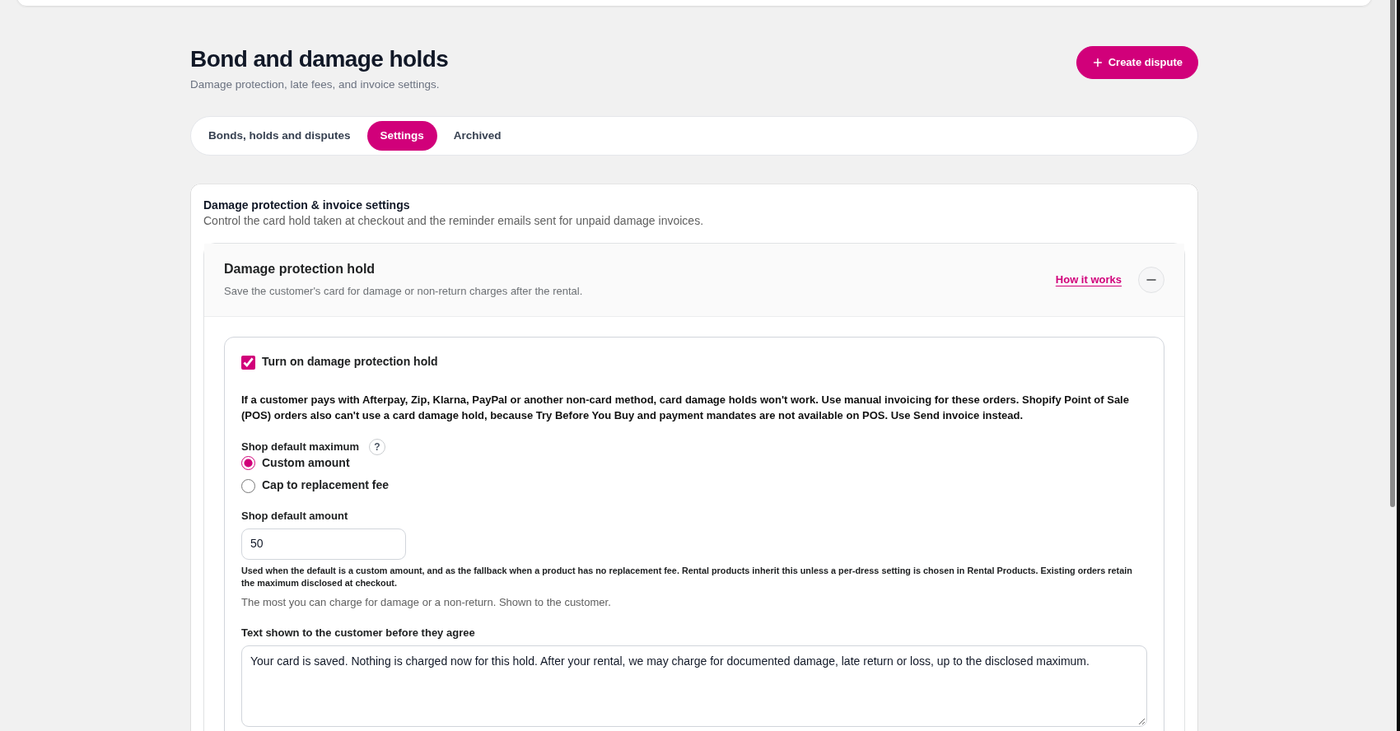
If the hold toggle won't stay on, grant the write_purchase_options permission when Shopify prompts you. To charge a saved card later you also need write_payment_mandate and write_order_edits — see Grant permissions below.
How the maximum is set
- Shop default maximum
- One amount for every dress, unless a product has its own setting. Also used as the fallback when a product is set to the replacement fee but doesn't have one.
- Custom amount
- A fixed amount you enter in settings, or a different amount on an individual product in Edit Product.
- Cap to replacement fee
- Uses the product's replacement value — from its Shopify compare-at price, or from a money metafield you choose — so the hold matches what it would cost to replace the dress.
The amount disclosed at checkout is the cap for that order. You can't charge more than that later.
What customers see
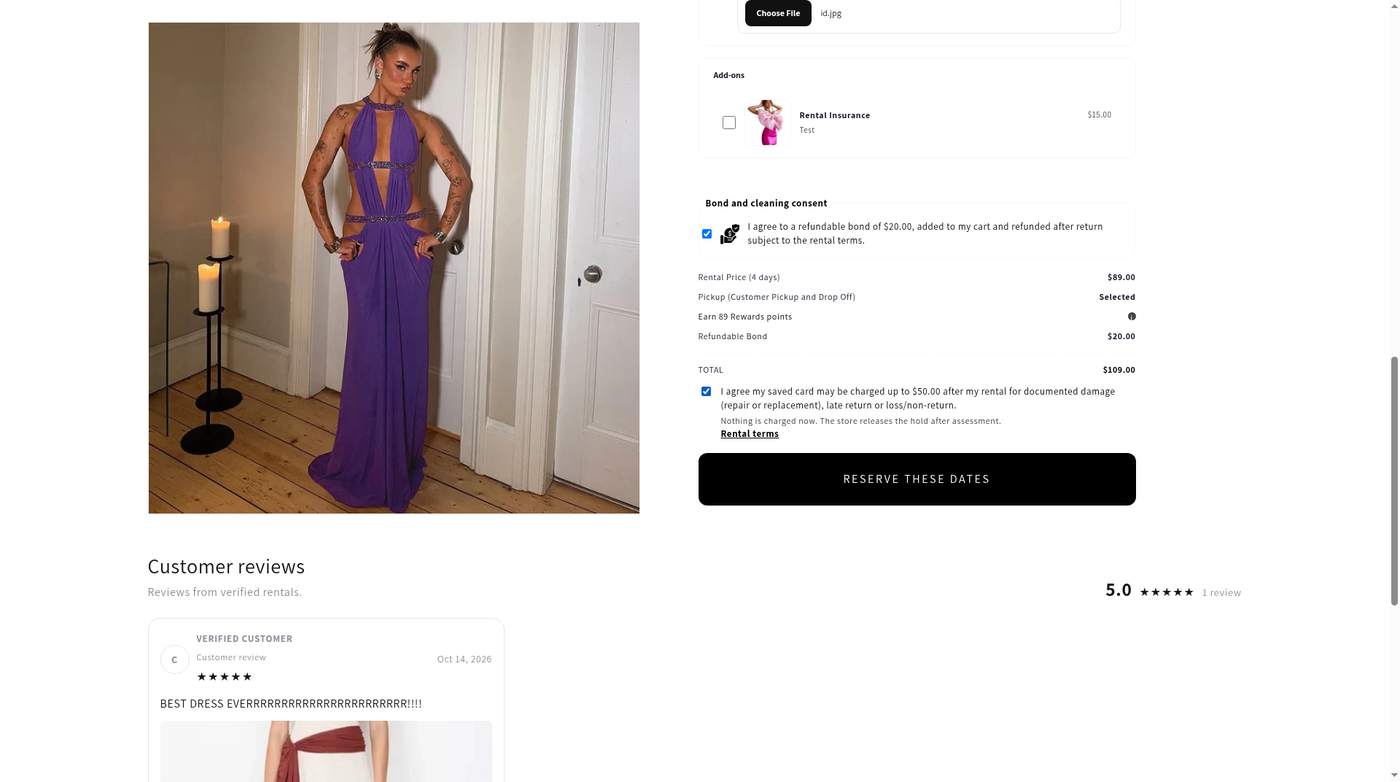
On the product page, the customer must tick two agreements when both are in use: the refundable bond (added to the cart and refunded after return, subject to your terms) and the card hold (their saved card may be charged up to the disclosed maximum after the rental, only for documented damage, late return or loss — nothing is charged now).
The cart then shows the dress, the refundable bond, and a $0 damage protection hold line. The hold's description explains it is charged only for documented damage, up to the disclosed maximum, and is not an automatic scheduled charge.
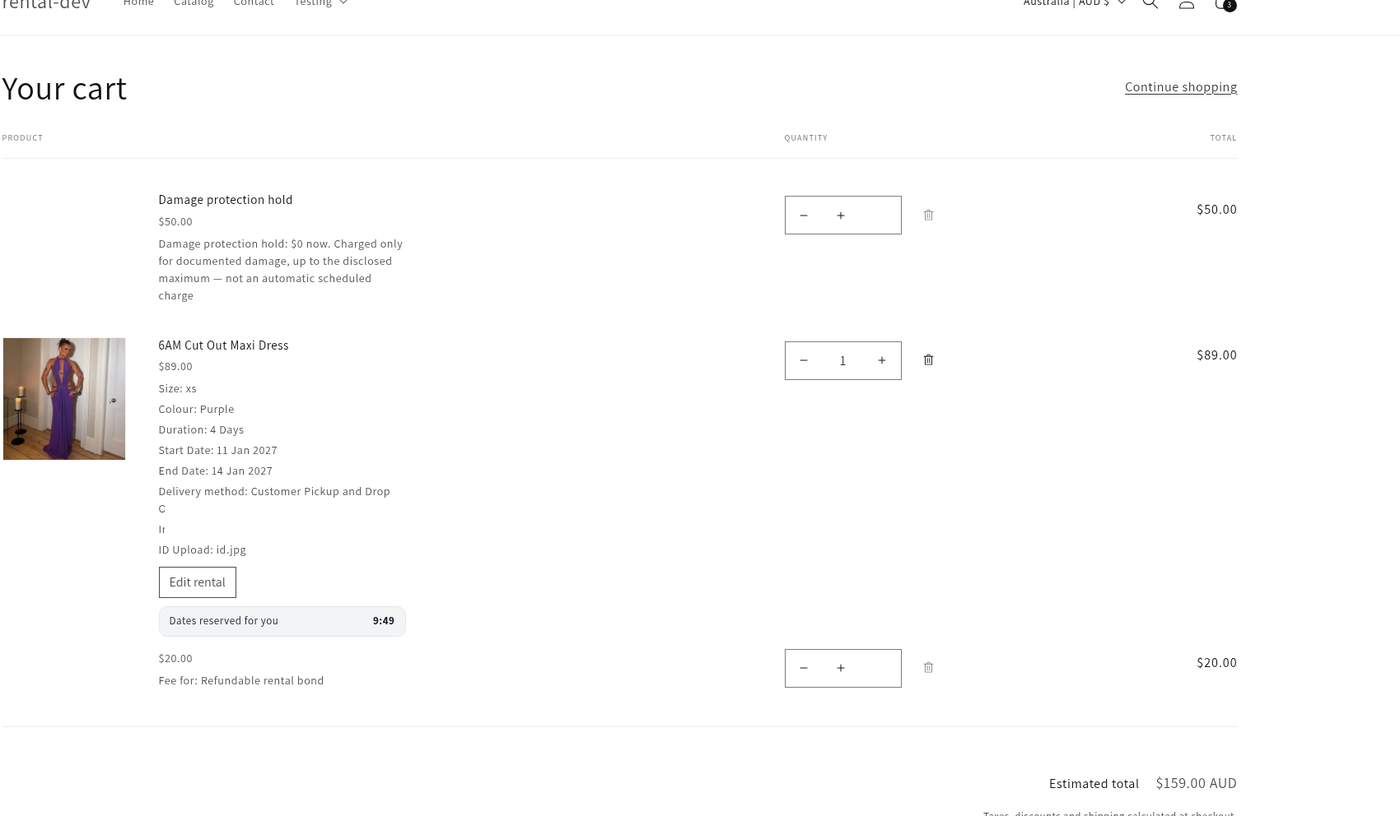
Shopify still shows its own due date (up to 365 days) and an “automatically charged” sentence on the selling plan. Apps can't fully remove that Shopify wording. The hold name and description from the app are clearer: nothing is charged now, and the app never charges the hold automatically. A charge only happens if you create a documented dispute and then choose to collect.
Grant permissions
A Grant permissions banner appears on the holds page when the shop is missing write_payment_mandate or write_order_edits. Until you grant them, Charge saved card is blocked — use Send invoice instead.
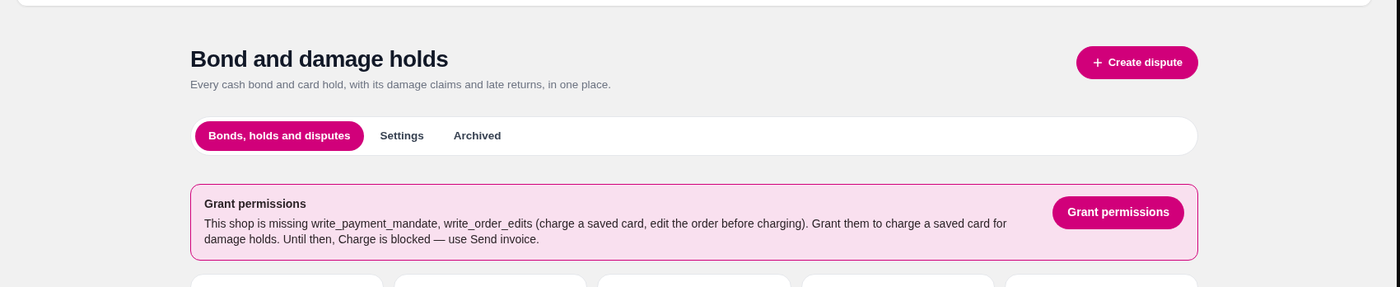
Click Grant permissions and approve the Shopify prompt. You only need to do this once per shop.
Afterpay, Zip, Klarna, PayPal and Shopify POS
Card damage holds don't work when the customer pays with Afterpay, Zip, Klarna, PayPal, or on Shopify POS. Try Before You Buy and payment mandates aren't available on those methods. Take a cash bond at checkout, and use Send invoice later if you need to collect for damage. The same applies to any other payment method that doesn't save a Shopify Payments card.
Brand colour
Damage invoices and invoice emails use the Brand Colour from Settings → General. If you haven't set one, they use a pink accent.
If you need us to set this up, please let me know as we provide free onboarding. Video walkthroughs are on our YouTube channel.